IOX Projects · cloud app for building-automation contractors
From floor plan to priced BOQ.
Upload the architect's drawing. IOX Projects finds the rooms, designs the automation room by room, builds the bill of quantities from your own catalogue, and prices it — ready to send.
Full access for 7 days · No credit card required
How it works
Four steps, one afternoon.
The work that used to take a week of spreadsheets and re-drawing is a single pass through the app.
Read the plan
Drop in a vector PDF. Rooms are found by exact geometry — not guessed — then reviewed one by one before anything is committed.
Design the rooms
Assign lighting, climate, shading, security and AV per room in the Experience Studio, at real scale on real walls.
Generate the BOQ
Devices are packed by capacity from your own catalogue, with cable runs and labour minutes calculated for you.
Price and send
Set margins, hit a target price, export a branded proposal — or share a live design the client can walk through.
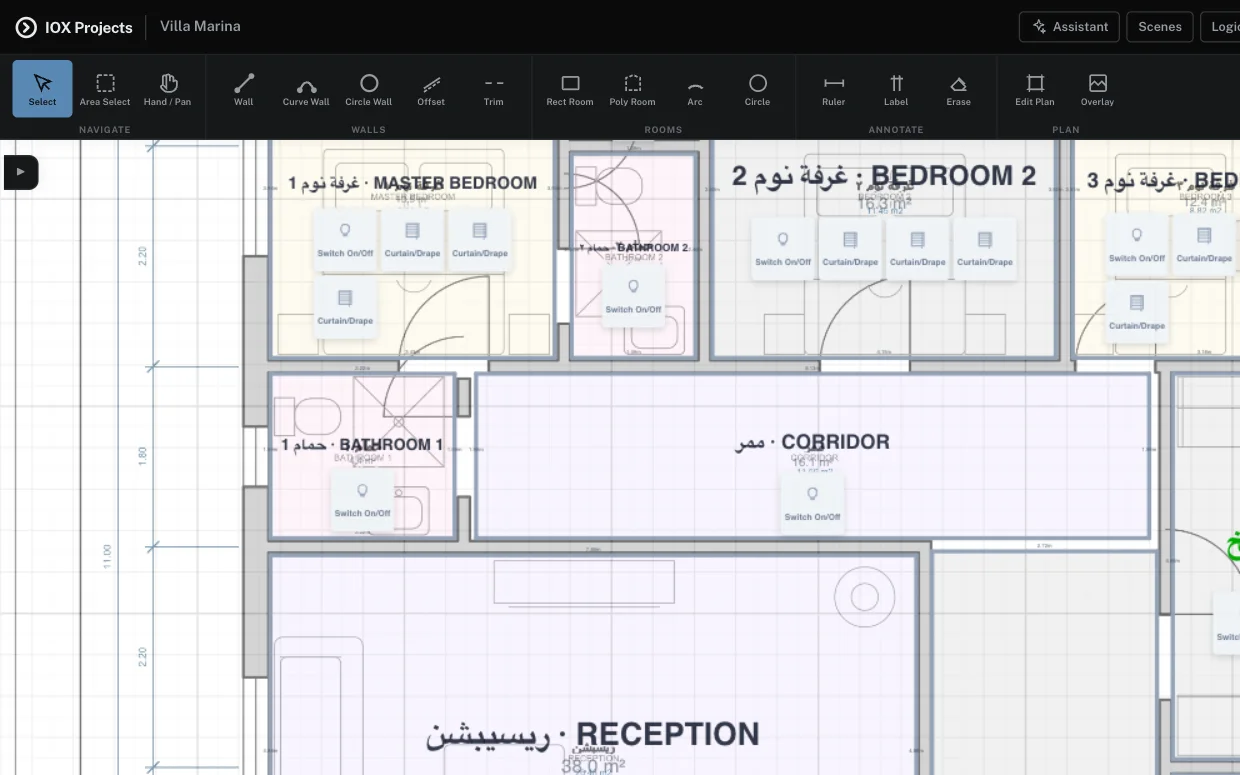
Experience Studio
A CAD editor that speaks automation.
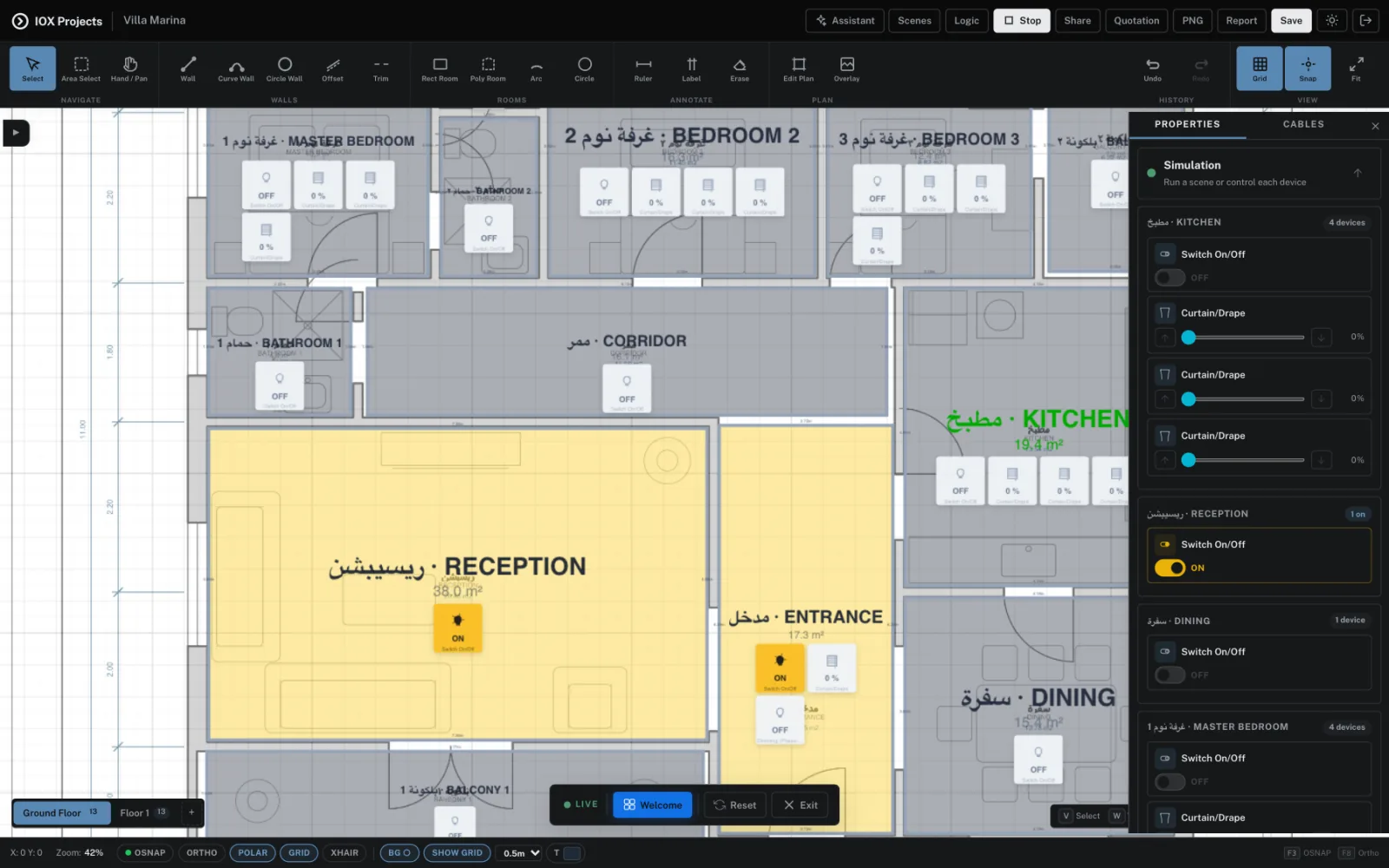
Draw with the tools you already know — endpoint and midpoint snaps, ortho and polar tracking, trim, groups, multi-floor, full undo. Then place devices on the plan and switch to simulation to see the house actually work.
- Object snaps, ortho tracking and trim — drawn to real scale
- Furniture and devices placed room by room, floor by floor
- Simulation mode: live tiles, keypads, scenes and automation rules
- Room types recognised in English and Arabic, with suggested functions
- One click hands the whole layout to the quotation
Client review
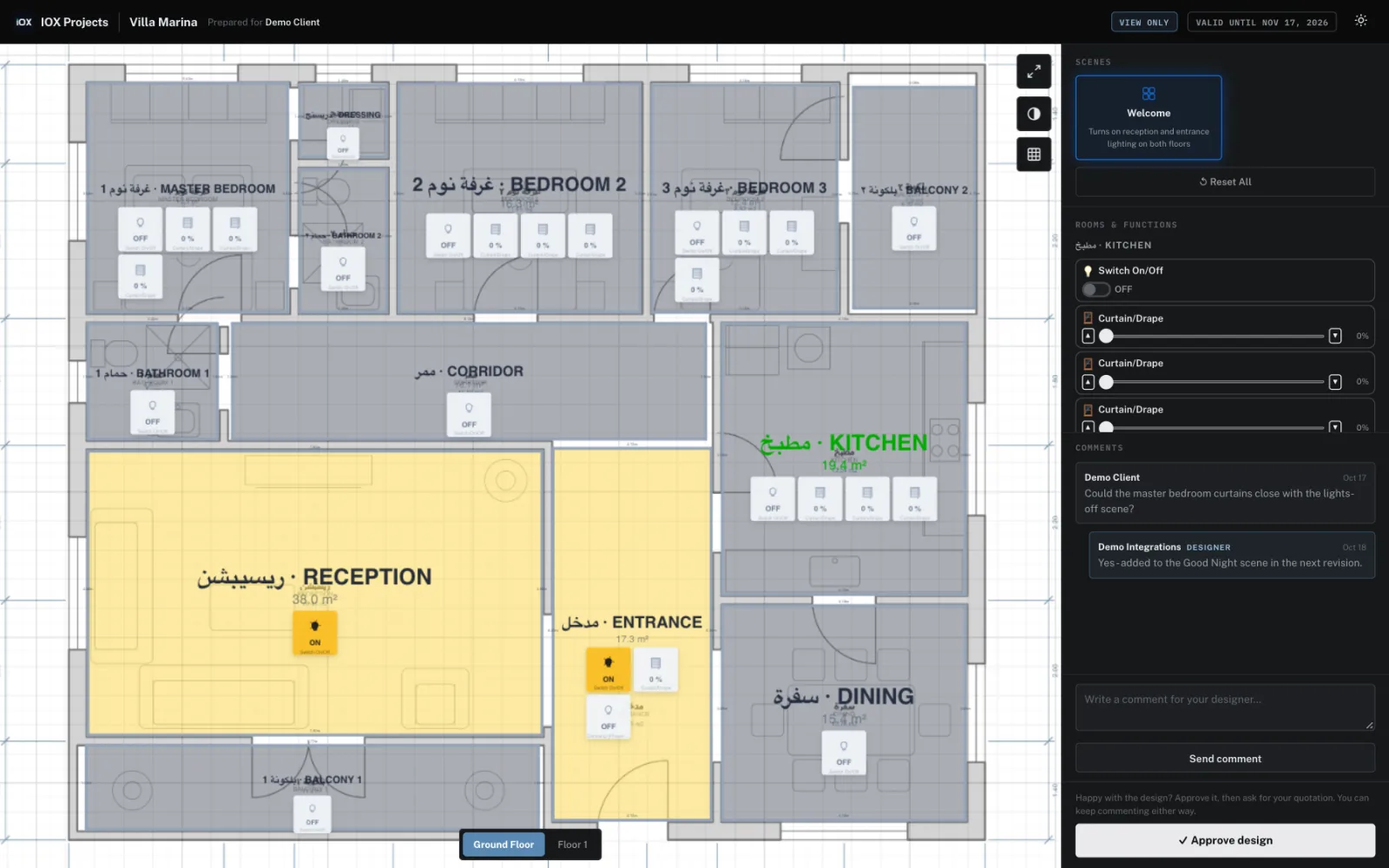
Let the client walk through it before they sign.
Send a link. Your client opens a branded viewer, moves floor to floor, switches on the lights you specified, and tells you what they want changed — with comments landing back in your customer record.
- Public or password-protected, expiring in 1–90 days or never
- Per-link permissions: comment, approve, request a quotation
- The client operates the simulated devices themselves
- Approvals and replies come back into Design Reviews
Design
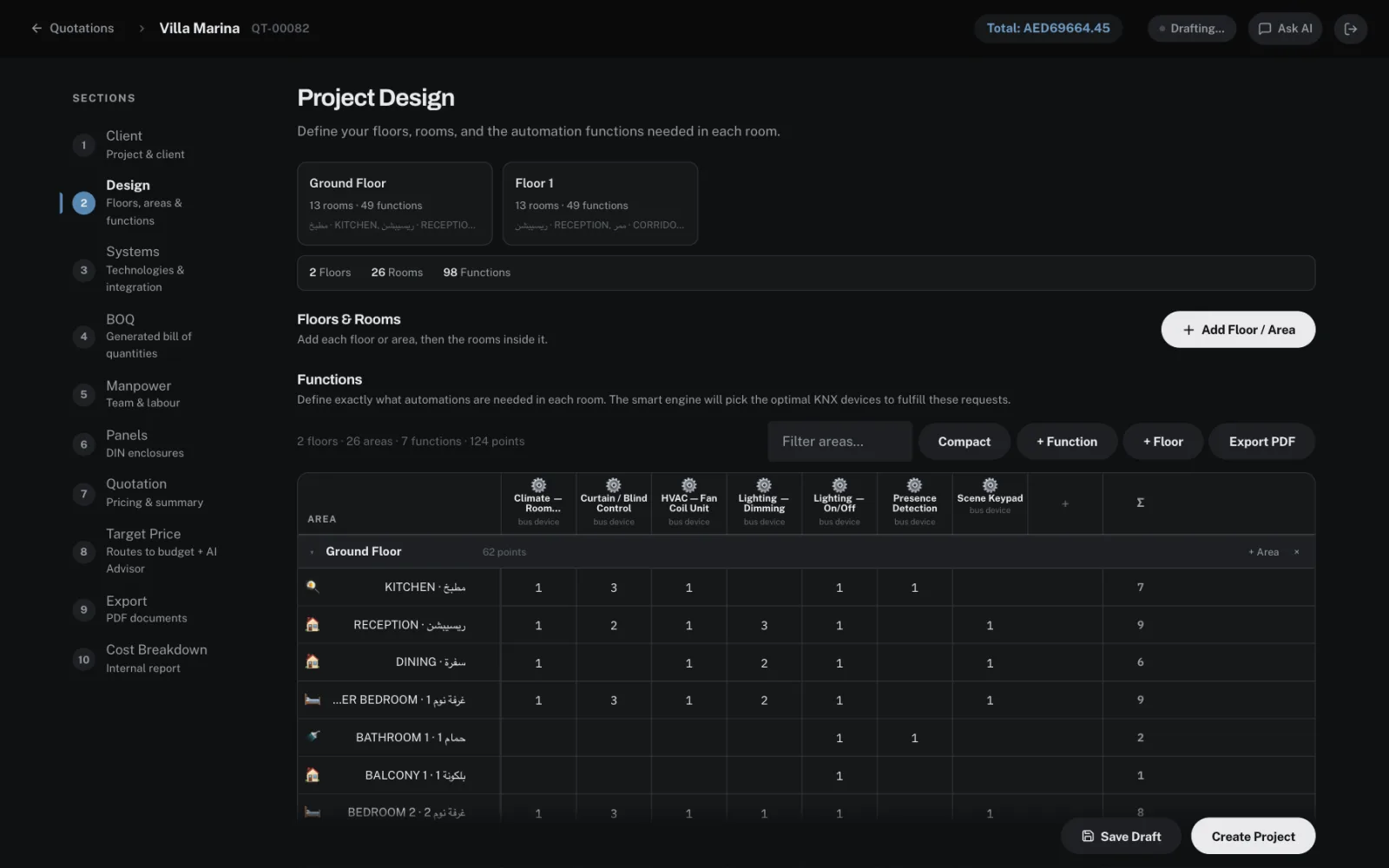
Every room and every function, in one table.
Rooms arrive from the Studio, or you type them in. Add a column for each function and set how many each room needs — the engine works out the devices from there.
- Lighting, shading, climate, HVAC, sensors, keypads, AV and access in one function list
- Filter rooms, switch to a compact view, export the schedule as a PDF
- Floors and areas for villas, buildings and commercial jobs
Bill of quantities
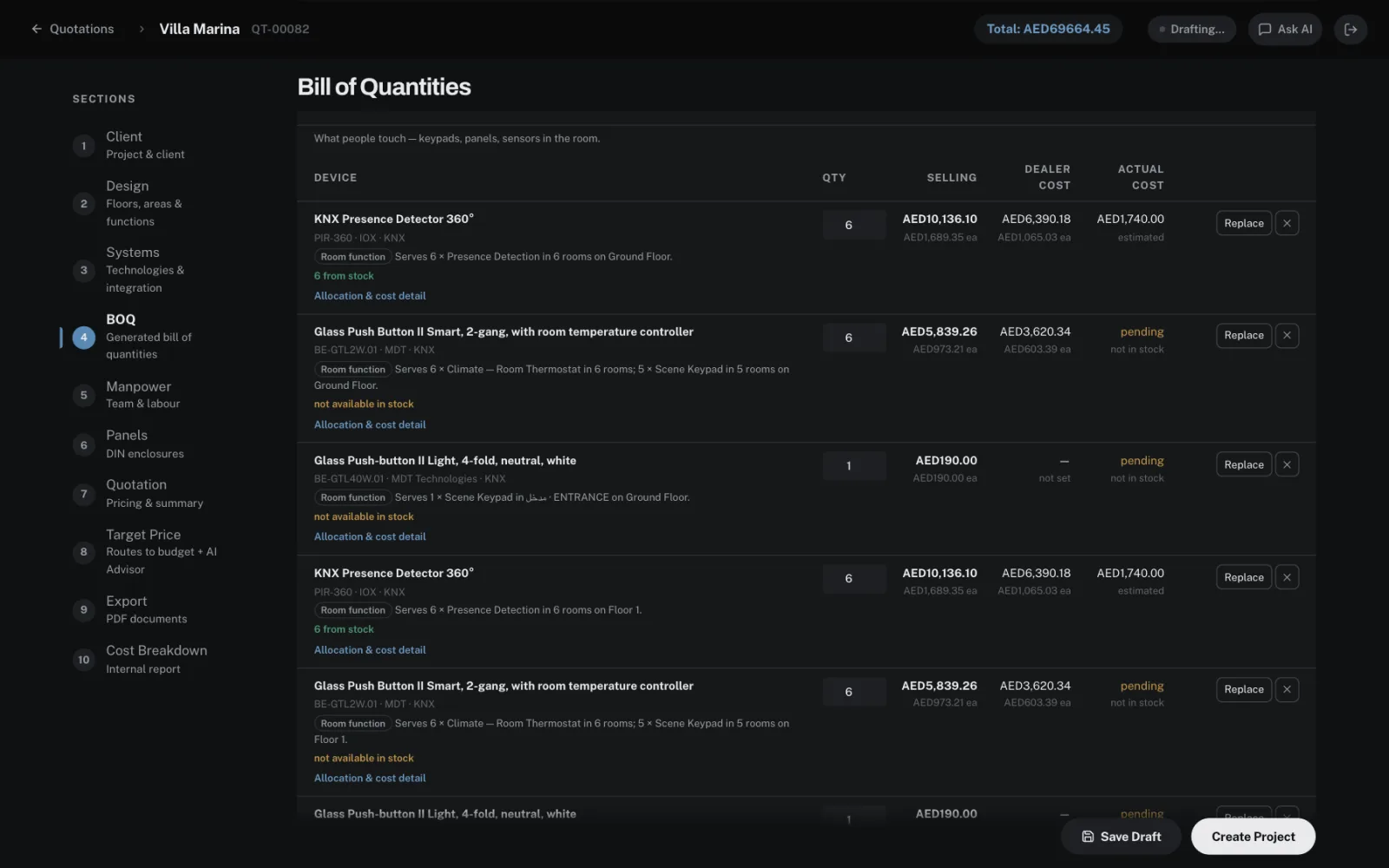
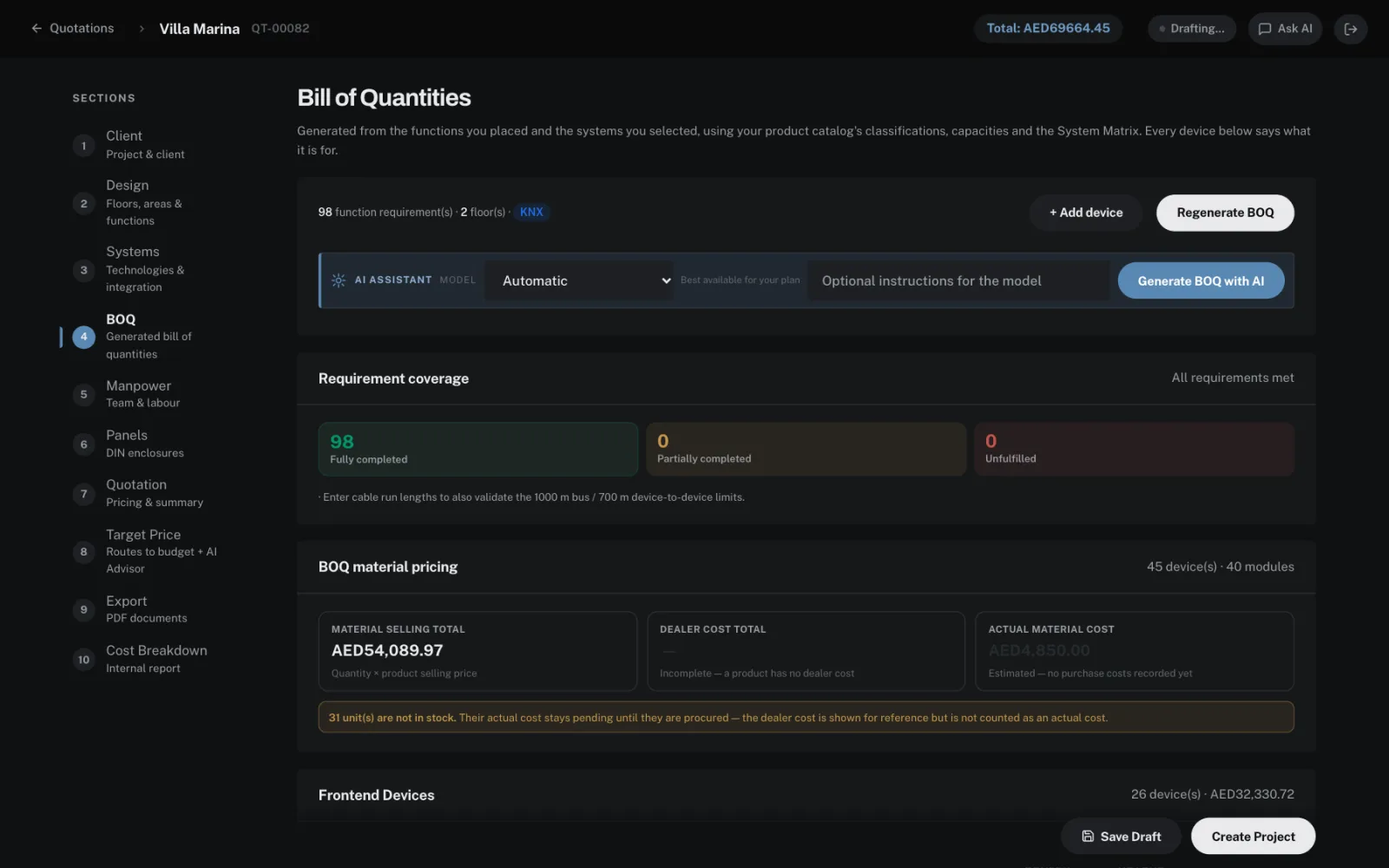
Every device says what it is for.
Generate the BOQ and devices are packed by capacity from your own catalogue: spare channels are used before another device is added, and each system's backbone comes from the System Matrix.
- Coverage check for every function requirement — complete, partial or unfulfilled
- Each line names the rooms and functions it serves
- Stock, dealer cost and actual cost traced to purchase orders
- Change a quantity or a device and the coverage is checked again
Replace a device
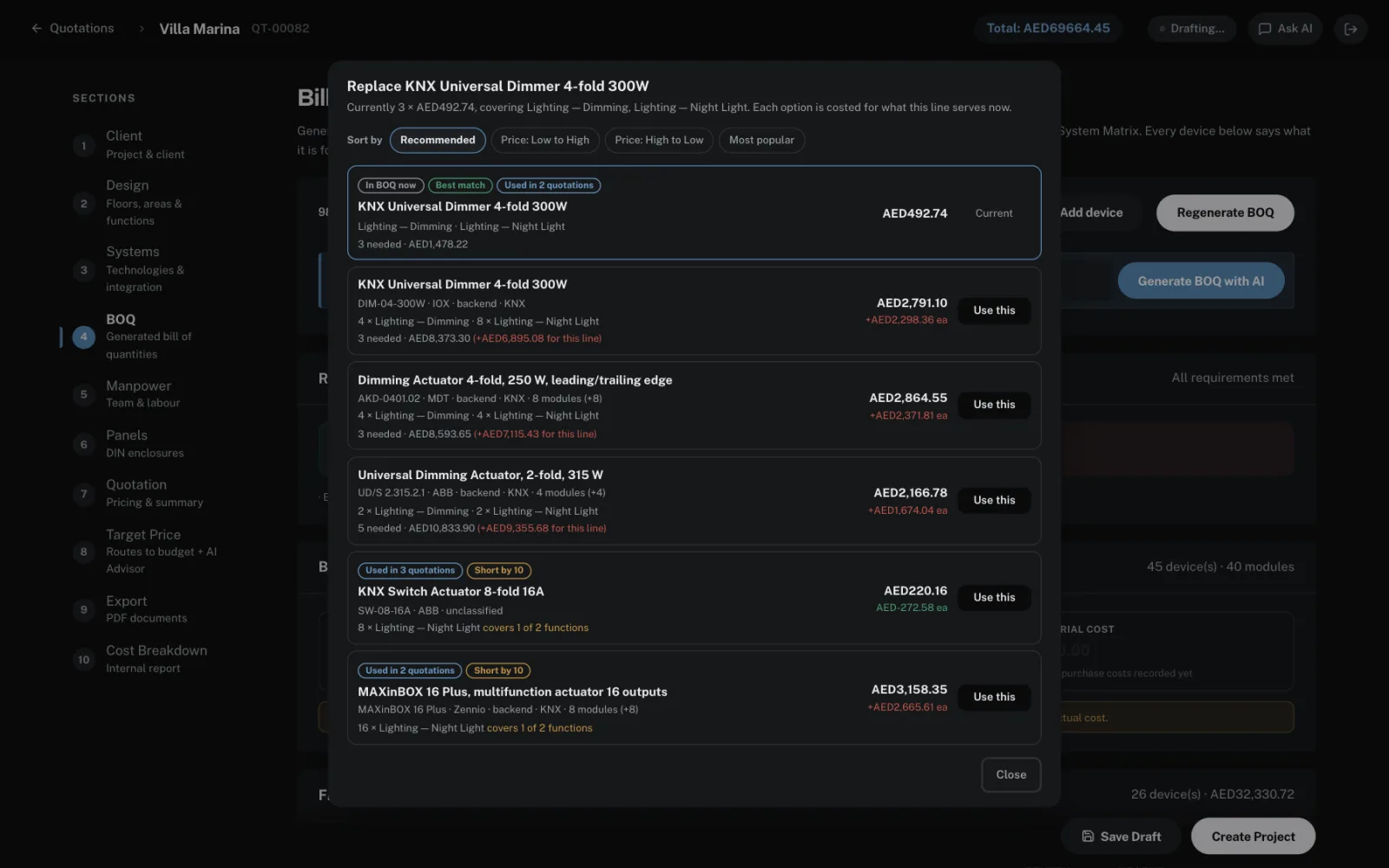
Swap any device — sorted the way you choose.
Replace lists every product in your catalogue that can do the same job, costed for what that line actually serves — not just the price of one unit.
- Recommended: covers the whole line at the lowest total
- Price low to high or high to low, or most popular in your own quotations
- How many you would need, and the difference for the line
IOX Device Library
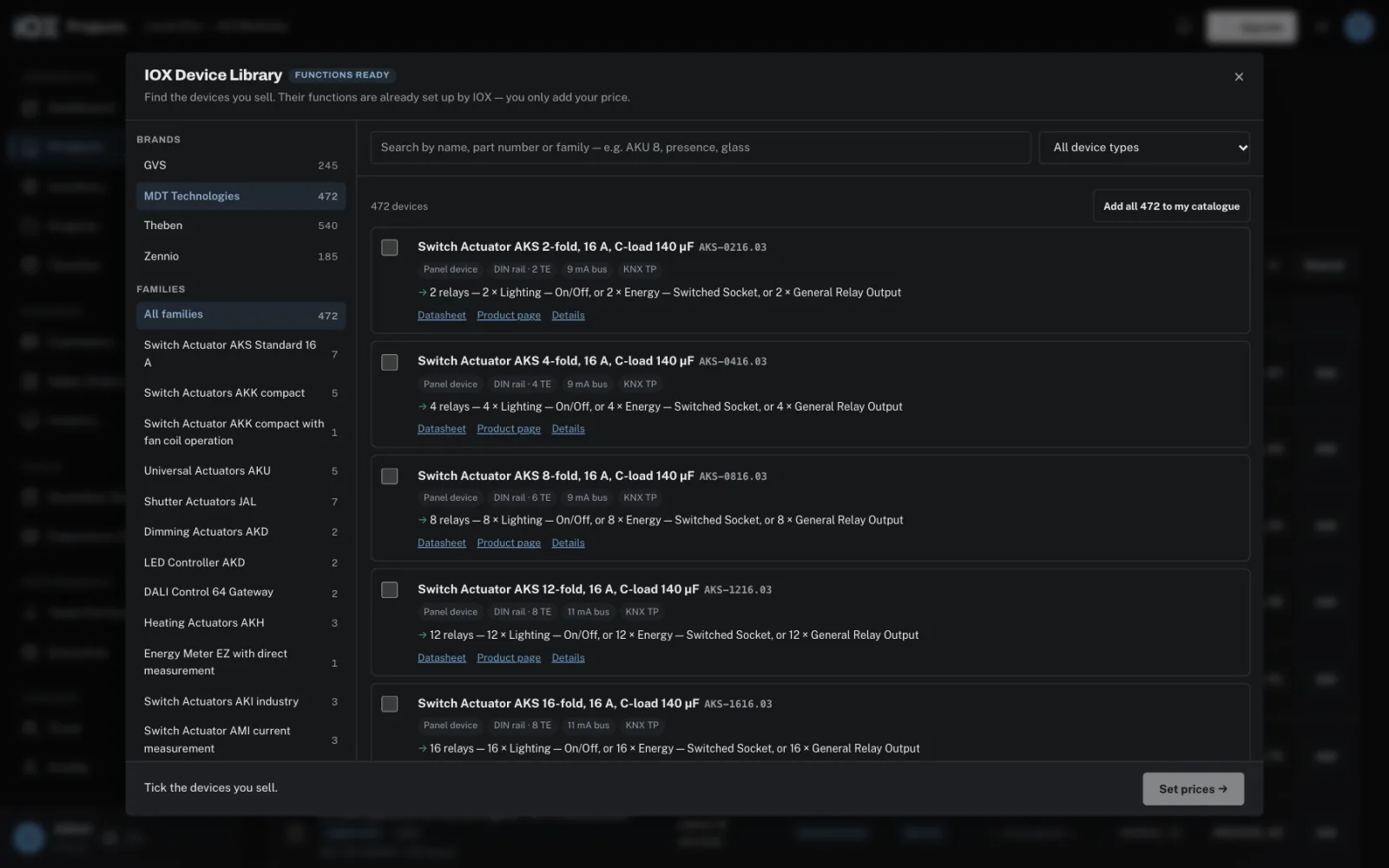
A catalogue that is ready on day one.
Pick devices from MDT, Zennio, GVS and Theben with their functions already set up by IOX — you only add your price. Or add a whole brand and price it from a spreadsheet.
- More than 1,400 devices with functions, DIN size and bus current
- Add one device, a family or a whole brand
- Download a price sheet, fill it in, upload it back
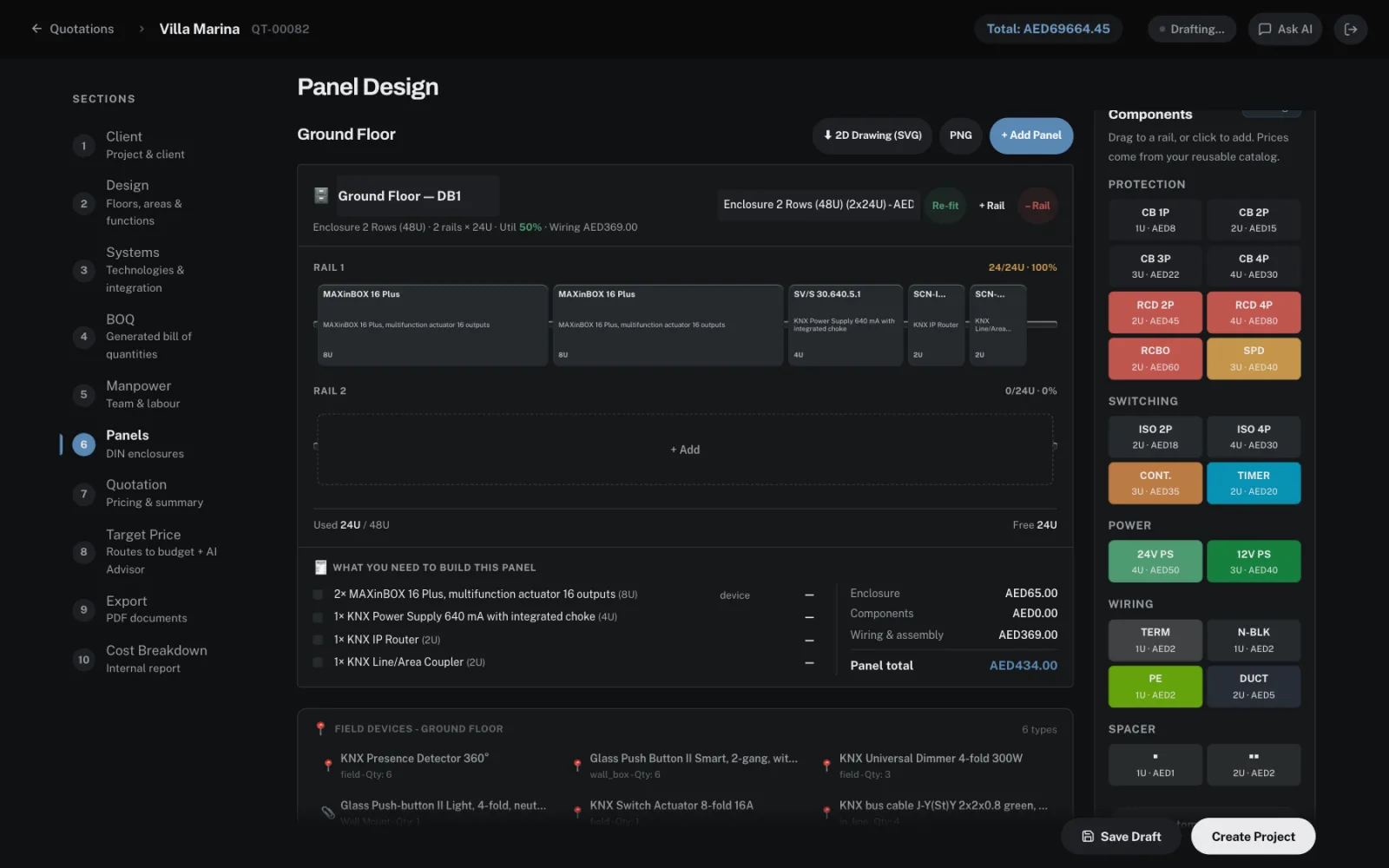
Panel design
Distribution boards laid out from the BOQ.
The DIN-rail devices on the BOQ are placed into enclosures for each floor, with rail fill and everything else the board needs to be built.
- Move modules between rails; add breakers, RCDs, power supplies and terminals
- Enclosure, components, wiring and assembly priced
- 2D drawings exported as SVG or PNG
Proposal
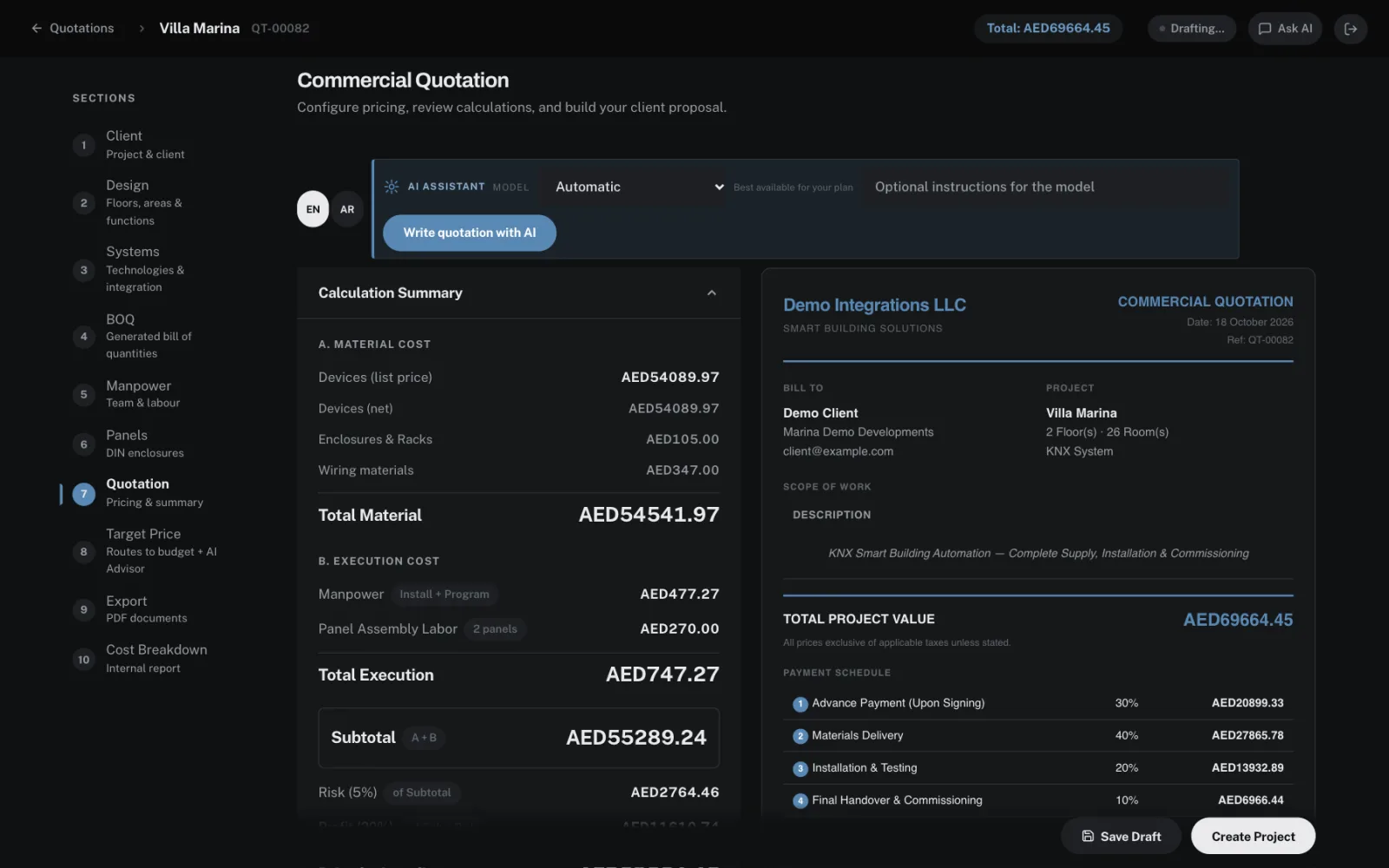
A proposal in your company's name.
Material, labour, panels, risk and margin roll up into one price, and the client document is built beside it with your branding, scope and payment schedule.
- English or Arabic proposal
- Payment milestones, validity and terms
- Target price: reach the client's budget with the AI Advisor
- Client proposal and an internal cost breakdown, both as PDF
Everything in the box
One system, quotation to cash.
Design, price, sell, order, invoice and deliver — without exporting to a spreadsheet in between.
Design & engineering
All plans unless markedExperience Studio
CAD-grade floor-plan editor with object snaps, multi-floor support and a live smart-home simulation.
Floor-plan import
Vector PDFs are parsed into rooms by pure geometry, snapped to the real walls, and reviewed before commit.
Smart Selection
Picks the optimal products from your catalogue for each room's functions, optimising cost per channel and module count.
Panel & rack design
DIN-rail enclosure layouts and 19" rack elevations, exported as dimensioned CAD-style drawings with a device schedule.
BOQ Generator
Capacity-based device packing with cable runs and labour minutes, and the requirement each line answers attached to it.
Premium & MaxAI assistant
Ask for a scene or automation rule in plain language. It reads your layout and proposes changes you apply one at a time.
Premium & MaxQuoting & sales
All plans unless markedQuotation builder
A ten-step pass from client brief to priced proposal, across 16 protocols — KNX, C-Bus, Dynalite, Lutron, DALI, BACnet and more.
Target price
Name the budget you need to hit. Ranked strategies show what to change across margin, discounts, panels and manpower.
Branded PDF export
Commercial and technical documents with your logo, colours and terms, at the disclosure level you choose.
Client sharing
An expiring, optionally password-protected link to the live design, with comments and approvals coming back to you.
Premium & MaxCRM & pipeline
Contacts, deals by stage and activities, linked to projects — with cash collected, pipeline value and won revenue on one dashboard.
Technical report
The internal breakdown: device schedule, panel design, cable specification, wiring, assembly labour and commissioning.
Orders, stock & delivery
All plansSales orders & invoices
Turn a won project into an order with payment milestones, then invoice each milestone and track what has actually been paid.
Stock & inventory
On-hand, reserved and available quantities, project reservations, reorder points and weighted-average cost valuation.
Suppliers & purchase orders
Supplier pricing, purchase orders generated straight from a shortage, receiving that advances stock, and account statements.
Project timeline
A full execution plan generated when a project is won, on a Gantt chart, with tasks auto-assigned to the right team role.
Progress & milestones
A pipeline board from draft to won, with milestone completion rolling up into overall project progress.
Product catalogue
Your own products with cost, margin, DIN size, bus load and function capacity — or add them from the IOX Device Library (MDT, Zennio, GVS, Theben) with the functions already set, and just enter your price.
Team & oversight
All plans unless markedRoles & permissions
Sales, engineer, manager, viewer or your own roles — with a per-member matrix and cost figures hidden from those who shouldn't see them.
Team performance
Scorecards blending real delivery metrics — tasks completed, on-time rate, overdue — with manager-entered quality scores.
Premium & MaxExecutive view
Top performers, who is available, department performance, and which skills only one person on the team actually holds.
Premium & MaxCompany & inventory reports
Two printable documents — the company position and the full stock, supplier and purchase-order picture — with money redacted per user.
Premium & MaxSecure by default
Email two-factor sign-in, invitation flow, login history and an activity log — with each company's data isolated from every other.
Your currency, your branding
Set the company currency and logo once; every quotation, order, invoice and report follows it.
Pricing
Straightforward monthly plans.
Pay monthly and cancel any time, or pay yearly and get two months free. The launch discount below comes off automatically at checkout.
Prices in USD, billed monthly. Compare every feature →
Questions
Answered.
What happens during the free trial?
Every feature is open for 7 days — including the BOQ generator, the AI assistant and client sharing. No card is needed to start. When the trial ends you pick a plan; the work you did is still there.
Which protocols does it support?
Sixteen: KNX, C-Bus, Dynalite, Lutron, Control4, Crestron, HDL, Loxone, BACnet, DALI, Modbus, Z-Wave, Zigbee/Matter, 0–10V, DMX512 and conventional wiring — each with its own panel, topology and cable rules.
Does it use my products or yours?
Yours. Every BOQ is built from your catalogue, with your cost and selling prices. Add devices yourself, or pick them — or a whole brand — from the IOX Device Library, where each device already knows what it does; you only add the price. Import and export by CSV at any time.
Can my client see the design?
Yes, on Premium and Max. You generate an expiring link — public or password-protected — and the client walks the floors, operates the simulated devices, leaves comments and approves. Their replies come back into your customer record.
What does the AI assistant actually do?
It sits beside the Experience Studio canvas. Ask for a scene or an automation rule in plain language and it reads your live layout and proposes changes, which you apply one at a time and can undo. It never edits your design on its own.
How many people can use it?
Five on Standard, ten on Premium, fifteen on Max. Each person gets their own sign-in, role and permissions, and you can hide cost prices from whoever shouldn't see them.
Can I change or cancel my plan?
Yes. Upgrade, downgrade or cancel from inside the app at any time — billing is handled by Stripe, and you can manage your card and invoices there directly.
Contact
Talk to us.
Questions about the protocols you work with, moving your existing catalogue across, or a team larger than fifteen people — tell us what you need and we will come back to you, usually within one business day.
- Help importing your product catalogue
- A walkthrough of the quotation and BOQ flow
- Pricing for a bigger team
Quote your next project in an afternoon.
Start with everything switched on for seven days. No card, no call, no setup fee.
Full access for 7 days · No credit card required